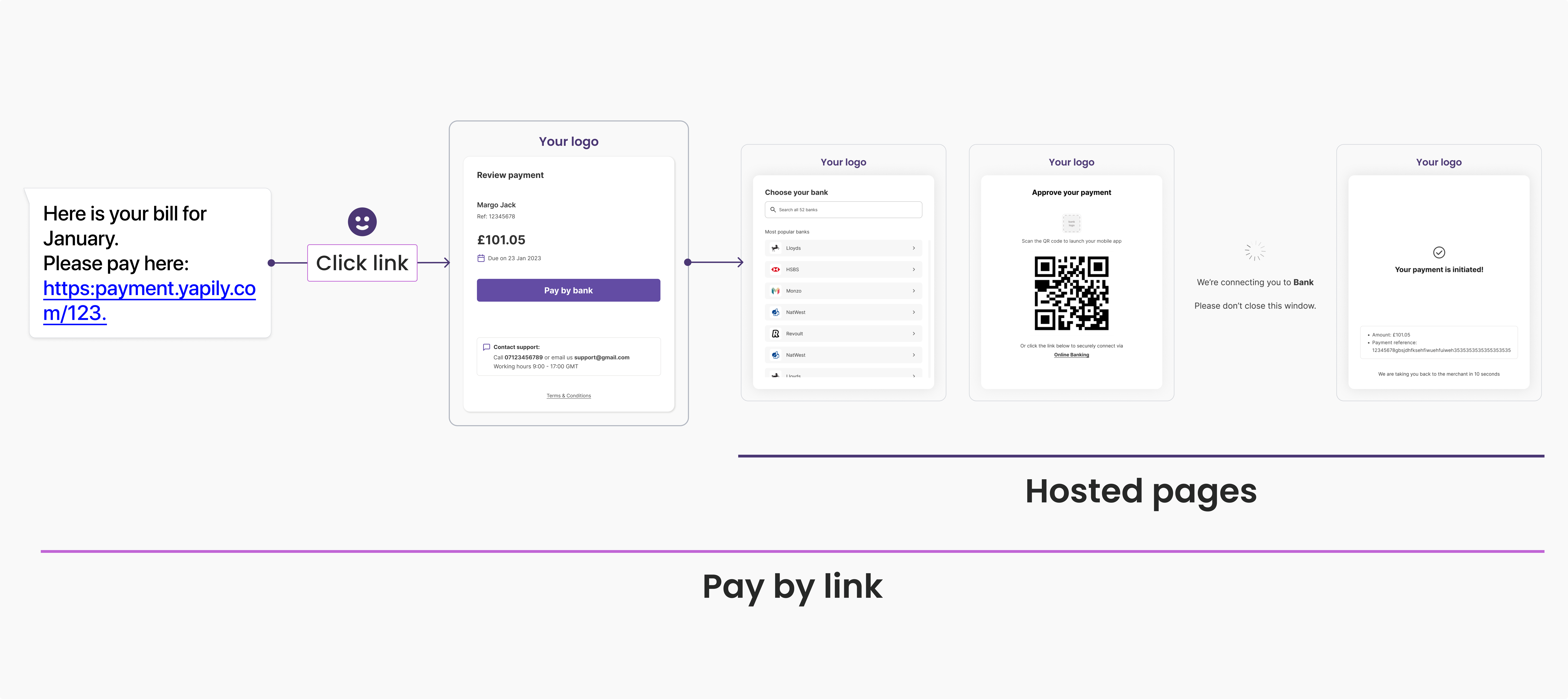
Pay By Link is available as a Private Beta version.
Please contact your Customer Success Manager if you would like to access it.
Introduction
Pay By Link enables you to generate a ‘request to pay’ link that you can send to a customer to initiate payment collection. When the user clicks the link, Yapily Hosted Pages facilitates the payment capture, authorisation and initiation process for a PIS payment. It provides a convenient and secure way to send a ‘request to pay’ link for a fixed amount to your end users. You can send the link you generate to your end user via any method, such as email or SMS. The link acts as a long lived payment request, allowing your users to click the link in their own time to start the payment journey. By default, the link expires after 7 days but this is customisable to a maximum of 30 days.Pay by Link can only be used to collect 1 single payment from the user.If the user accesses the link after already successfully authorising a payment, they will receive a warning and not be able to initiate another payment.
Applications
You can use Pay By Link in multiple payment scenarios. Missed payments: Recover missed payments and direct debit failures by sending a link to collect the payment. Cart abandonment: Send follow-up links to the user to reduce cart abandonment. Payment reminders: Send reminders with the flexibility to pay later. Pay now or later: Provide the option to pay or top-up now or in the near future via pay by link or a QR code. Don’t see your use case? Let us know how you would like to use Pay By Link.End user journey
Pay By Link provides a ‘request to pay’ link, and a pre-built UI to manage the entire user journey from asking the user to make a payment through to initiating the payment request. A typical user journey is:- The end user receives a request for a payment from you via email or SMS.
- The user clicks the link in the SMS (or other delivery method).
- The user is redirected to Yapily’s Pay By Link landing page that includes a summary of the payment request.
- The user confirms the request by clicking ‘Pay by bank’.
- The user proceeds to complete the payment authorisation flow on Yapily Hosted Pages. The user completes the payment authorisation flow and is redirected back to your application on completion.