

Links
Platform V1
Scopes
- Account Information 🔒
Live Environment
Precondition: To connect to live Open Banking entities, whether you are accessing account information or initiating payments, your business must have the right regulatory permissions as per the Open Banking Guide.- Upload your QWAC/OBWAC and QSEAL/OBSEAL certificates (PEMs), along with the keys into Yapily’s certificate vault.
-
Add Handelsbank UK from the Live tab to your Dashboard application and add your
Client UriandTerms of Service Uri. - Select your QWAC/OBWAC and QSEAL/OBSEAL certificates from the relevant drop-downs lists then click Next.
-
On the next Page, Click the ‘Register’ button to Register your certificates to Handlesbank UK. If successful it will generate
Client IDalong with whole registration response. Click ‘Save’ to save the response.
Platform V2
For our platform V2 offering there are a few differences:
- The institutions now include PIS.
- There is a new sandbox that can be integrated with.
- The AIS includes credit card accounts.
Scopes
- Account Information 🔒
Supported ASPSPs
| ASPSP | Link | Supported | Institution ID |
|---|---|---|---|
| Handelsbanken UK | https://developer.handelsbanken.com | Yes | handelsbanken_uk |
| Handelsbanken Business UK | https://developer.handelsbanken.com | Yes | handelsbankenbusiness_uk |
| Handelsbanken UK Sandbox | https://developer.handelsbanken.com | Yes | handelsbanken-sandbox_uk |
Accounts Currently Supported - Payments Soon to Come
Accounts
- Accounts
- Transactions
Onboarding ASPSP’s to Yapily Application
Precondition: To connect to Handelsbanken institutions with eIDAS/OB certs a dynamic registration is needed. Even if you have pre-existing credentials that are being used for V1, please re-register as the V2 integration requires additional subscriptions (e.g. for payments and card-acounts). Pre-requisites for DCR:- Valid QWAC / QSEAL certificates.
-
Upload the signing (OBSEAL/QSEAL) and transport (OBWAC/QWAC) certificates into V2 services
-
For the transport certificate upload with the following request. If it already uploaded, then note down its UUID which can be retrieved from the
GET 'https://api.yapily.com/certificates/keys/'endpoint. RequestResponseSave the id and remember for which kind of key it corresponds: e.g.TRANSPORT_KEY_UUID = d16f87d3-4222-4173-b8b9-44aeccacae7d
-
For the transport certificate upload with the following request. If it already uploaded, then note down its UUID which can be retrieved from the
-
Call the registration endpoint with the certificate UUIDs:
Request
ResponseNote above ID, this will be the clientId which can be further used to Get, Modify, Delete registrations with Yapily.
Sandbox institution
Precondition: To connect to Handelsbanken sandbox institution with eIDAS certs a manual registration is needed. Pre-requisites for Manual Reg:- We must create an app with on the developer portal to obtain the client ID. Make sure we have added the following subscriptions for the app:
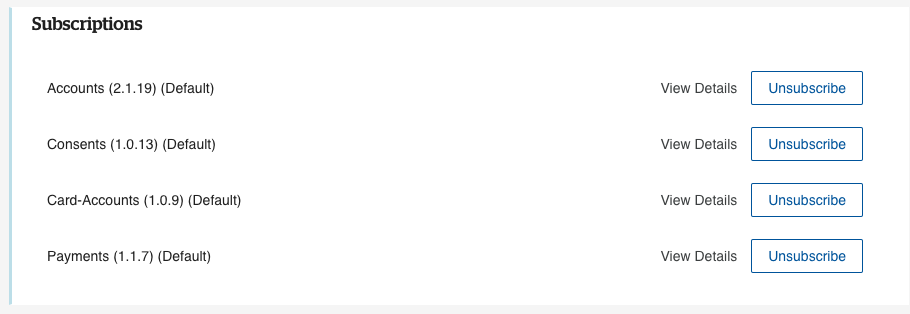
-
Call the manual registration endpoint with the certificate UUIDs and the client ID:
Request
Response